
Join us at Microsoft Ignite, booth #1766, Nov 17-19. Schedule time to meet. Meet Us at Microsoft Ignite

What’s new

The new way to license collaboration migrations

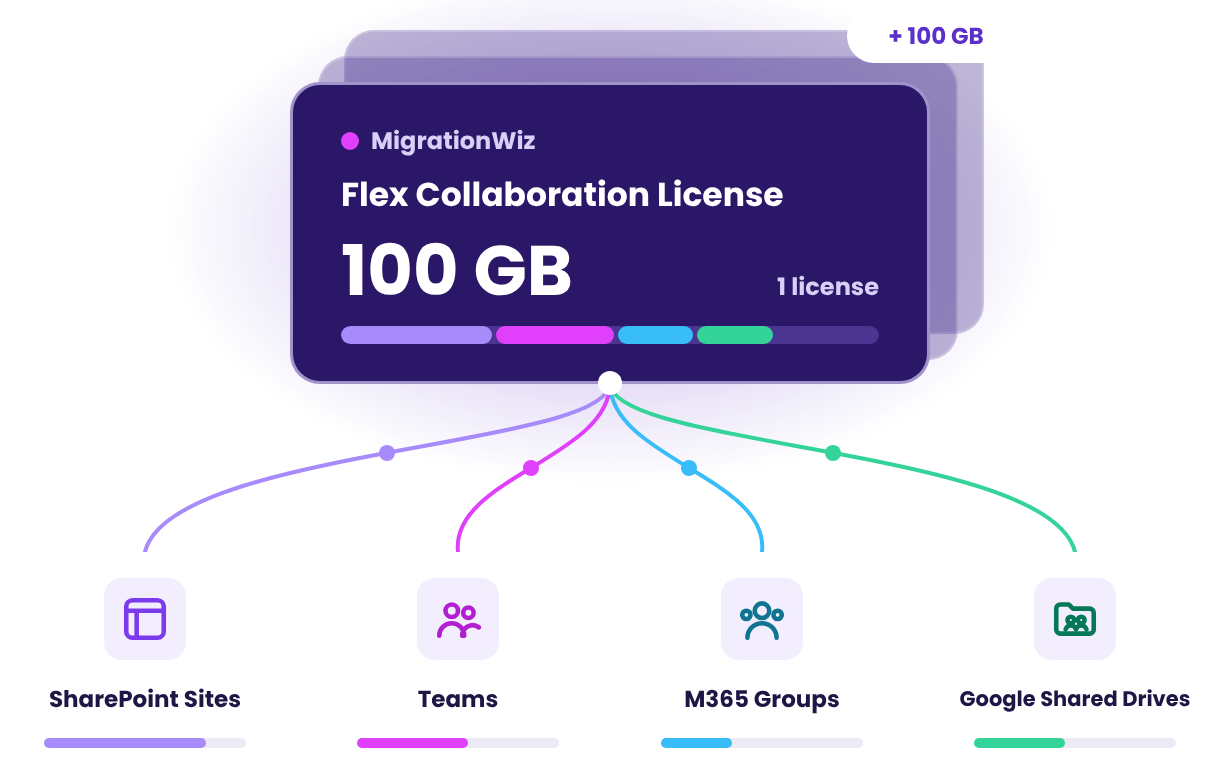
Until now, Teams and shared documents each needed their own license, and shared documents were priced per library. Flex Collaboration replaces both with one license that works across four workloads.

New: replaces two licenses

One license, four workloads

The same license works for a SharePoint Site, a Team, a Microsoft 365 Group site, or a Google Shared Drive.

New: buy once, assign later

Decide where licenses go later

Licenses you haven’t applied yet can go to any of the four workloads, so you don’t need to split your purchase by workload up front.

New: sized by data, not libraries

Simple 100 GB sizing

Every license covers up to 100 GB on any workload. Bigger Sites, Teams, or Shared Drives simply take more licenses, with no library-by-library counting.

SharePoint Site Migrations

Move entire SharePoint Online site collections, with every subsite, library, permission, and sensitivity label, as one project. Licensed with Flex Collaboration.

What It Covers

Each license covers one SharePoint Site, Team, Group site, or Shared Drive, with every library inside it.

WORKLOAD INCLUDED
SharePoint Sites NEW The full SharePoint Site collection, with its subsites and every document library, migrated as one project line
Microsoft Teams The Team, Channels, Posts, Private Channels, the default Shared Documents library, and every additional library attached to the Team
Microsoft 365 Group sites The group's Team and SharePoint content
Google Shared Drives The Shared Drive's folders, files, and permissions, migrated to SharePoint Online or to another Google Shared Drive

Supported Migration Paths

Built for Microsoft 365 and Google Workspace collaboration content.

SharePoint Online → SharePoint Online
Microsoft Teams → Microsoft Teams
Google Shared Drive → SharePoint Online
Google Shared Drive → Google Shared Drive
SharePoint Online → Google Shared Drive
File Server shares → SharePoint Online

A Site That Works on Arrival

Flex Collaboration migrates the whole site, not just its files, so users get to work the day you cut over.

Content fidelity

Sensitivity labels and their encryption preserved (via an optional BitTitan app you choose to authorize)
Managed metadata applied at the item level
Created By, Created Date, Modified By, and Modified Date preserved
Custom list and library columns, values, and descriptions
OneNote notebooks that open as notebooks
Full version history (all versions by default, configurable)
Site pages

Site structure and security

Site navigation and content types
Term store applied to the site
Site permissions, SharePoint groups, and custom permission levels
Permission changes picked up on every re-sync pass
Hub-site associations, including hub term group properties
Applied to every subsite in scope, not only the top-level site

How Licensing Works

One license per SharePoint Site, Team, Group site, or Shared Drive, in 100 GB increments.

1 license per workload

Every site, Team, Group site, or Shared Drive you migrate uses at least one license.

100 GB increments

Each license covers up to 100 GB of one Site, Team, Group site, or Shared Drive. Larger ones use more than one.

Flexible until applied

Unassigned licenses aren’t tied to a workload. Put them toward SharePoint Sites, Teams, Group sites, or Google Shared Drives as your project takes shape.

$50
USD MSRP per license · 1 per site, up to 100 GB

Size your project in minutes

Count the SharePoint Sites, Teams, Group sites, and Shared Drives you plan to migrate: each needs at least one license, in 100 GB increments. The SharePoint Admin Center’s Site count-and-size report lists every site with its size.

Buy Now Talk to an Expert

Which License Do I Need?

IF YOU ARE MIGRATING... CHOOSE
SharePoint Sites or Teams Flex Collaboration · $50 per 100 GB
Microsoft 365 Group sites Flex Collaboration · $50 per 100 GB
Google Shared Drives Flex Collaboration · $50 per Shared Drive, per 100 GB
A Microsoft 365 Group with a mailbox Tenant Migration Bundle · $60 per user

FAQs for Flex Collaboration

Does Flex Collaboration replace the Teams Collaboration and Shared Documents licenses?
Yes. Flex Collaboration brings the Teams Collaboration, Shared Documents 50 GB, and Shared Documents 100 GB licenses together into one license. Those licenses remain available to purchase until December 31, 2026.
Can I still use the Teams Collaboration or Shared Documents licenses I already own?
Yes. Licenses you have already purchased remain usable. Want to trade them up? Talk to your BitTitan sales representative.
Does Flex Collaboration cover Google Workspace and file server migrations?
Yes. It is used for SharePoint to SharePoint, Google Shared Drive to SharePoint, Google Drive to SharePoint, File Server shares to SharePoint, SharePoint to Google Shared Drive, and Google Shared Drive to Google Shared Drive.
Do I need a separate license for each document library?
No. Licensing is by data volume, not by library. Every library in the site or Team you migrate is covered.
What if more of the data turns out to be in SharePoint than in Teams?
Reallocate your licenses. Flex Collaboration licenses move between Teams, SharePoint Sites, and mailbox-less Microsoft 365 Groups with no repurchase.
How do I estimate how many licenses I need?
Use the Site count-and-size report in the SharePoint Admin Center. Add up the data for the sites you plan to migrate and divide by 100 GB, rounding up.

Ready to Move Your sites, Teams and Shared Drives?

Buy Flex Collaboration licenses online, or talk to a migration expert about scoping your project.