Join us at Microsoft Ignite, booth #1766, Nov 17-19. Schedule time to meet. Meet Us at Microsoft Ignite

What’s new

SharePoint migration, rebuilt around the site

Four changes that make migrations simpler to scope, run and license.

New: whole site migration

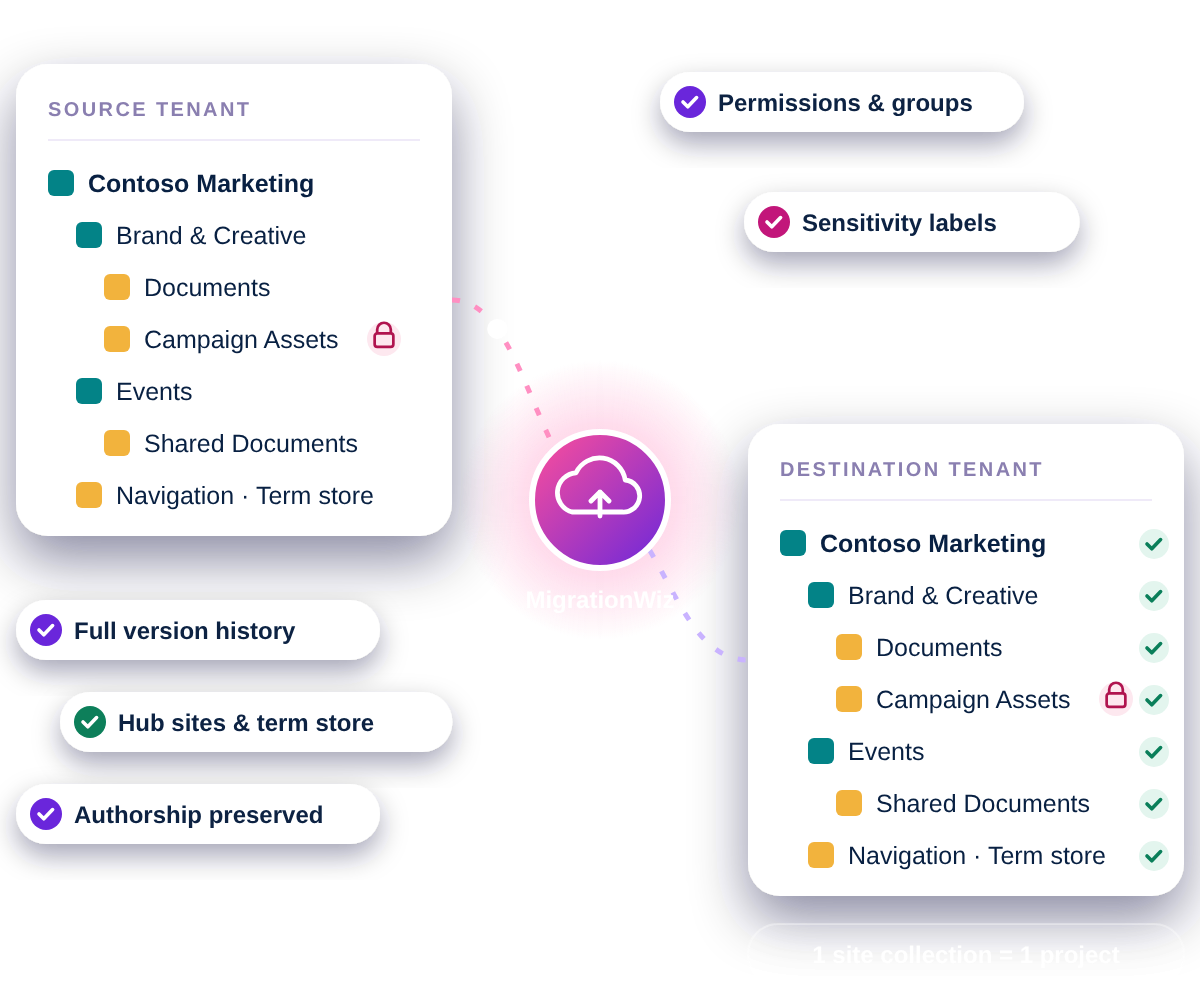
Whole sites, in one project

The full site collection, with every subsite and library, discovered automatically and migrated as one project line.

New: site structure

Everything that makes a site work

Structure, navigation, permissions, metadata, version history, and authorship come with the content.

New: label-aware

Sensitivity labels intact

Labels stay on every file, and their encryption is preserved through an optional BitTitan app you choose to authorize.

Introducing Flex Collaboration

One new license type for SharePoint Sites, Microsoft Teams, Microsoft 365 Group sites, and Google Shared Drives. It replaces the Teams Collaboration and Shared Documents licenses.

Everything a Site Needs, Migrated Together

MigrationWiz brings over the content, the structure, and the protection that make a site work, so your users pick up right where they left off.

Sensitivity labels

Labels stay on every file, and their encryption is preserved through an optional BitTitan app you choose to authorize. Protected content stays protected.

Site structure

Navigation, content types, site pages, and the term store applied to the site, for every subsite in scope.
permissions_tile

Metadata and columns

Item-level managed metadata, custom list and library columns, values, and descriptions.
sensitivity-labels_tile

Permissions

Site permissions and groups, custom permission levels, and changes picked up on every repeat pass.
full-version-history_tile

Full version history

All versions migrate by default, with the option to set your own limit.
authorship-preserved_tile

Authorship preserved

Created By, Created Date, Modified By, and Modified Date stay exactly as they were.
hub-sites_tile

Hub sites

Hub-site associations migrate, including hub term group properties.
onenote-notebooks_tile

OneNote notebooks

Notebooks arrive as notebooks that open and work, not as folders of files.

How It Works

From sizing to cutover, a SharePoint Site
migrationtakes a few clicks.

1


Size it

Pull the Site count-and-size report from the SharePoint Admin Center and divide by 100 GB to get your license count.

2


Discover it

Point MigrationWiz at the source tenant. Autodiscovery walks the full site collection and lists it as one project.

3


Scope it

Migrate the whole site, or use optional site, subsite, and library filters to move only what you need.

4


Migrate it

Run the migration from the cloud and re-run passes as needed. Permission changes are picked up each time.

Built for MSPs and IT Teams

Whether you migrate sites for many customers or for your
own organization, MigrationWiz keeps the project simple.

For MSPs

  • Quote confidently from a report every Microsoft 365 admin already has
  • Fewer project lines to set up and manage on every job
  • Every library attached to a Team is covered automatically
  • Site, subsite, and library filters for merger, acquisition, and divestiture carve-outs

For internal IT teams

  • Budget the migration from the Admin Center report
  • Nothing to install or maintain: MigrationWiz runs on Microsoft Azure
  • Sites arrive ready to use, so users are productive from the first day
  • Reuse remaining Flex Collaboration licenses on your next project

Why Users Love MigrationWiz

A migration platform built in the cloud, for the cloud.

No installations

MigrationWiz is 100% SaaS on Microsoft Azure. There are no servers or desktop apps to set up, and migrations keep running whether or not you’re signed in.

Simple licensing

One Flex Collaboration license covers SharePoint Sites, Teams, and Microsoft 365 Groups, and can move between them without repurchasing.

Teams included

Migrating a Team? Its Channels, Posts, Private Channels, and every attached library are covered by the same license.

Supported Migration Paths

Site-level migration is built for SharePoint Online. The same Flex Collaboration license also brings content into SharePoint from other sources.

SharePoint Online → SharePoint Online
Google Shared Drive → SharePoint Online
Google Shared Drive → Google Shared Drive
File Server shares → SharePoint Online
$50
USD MSRP per license · 1 per site, up to 100 GB

Licensed with Flex Collaboration

Every site needs at least one license, and each license covers up to 100 GB of that site. Licenses are sold in 100 GB increments, so larger sites use more than one. Once a license is applied to a site, it stays there, even if the site uses less than 100 GB.

Buy Now Learn about Flex Collaboration

FAQs for SharePoint Site Migrations

What is a SharePoint site-level migration?

MigrationWiz migrates an entire SharePoint Online site collection as one project, including its subsites, document libraries, site structure, permissions, and sensitivity labels, instead of migrating each library separately.

Are sensitivity labels and encryption preserved?

Yes. Sensitivity labels stay on every file, and their encryption is migrated through an optional BitTitan app that you choose to authorize, so protected content stays protected on the destination.

Can I migrate only part of a site?

Yes. Site, subsite, and library filters are optional. Use them to migrate exactly what you need, for example for a divestiture or a phased move.

What site settings and structure migrate?

Site navigation, content types, the term store applied to the site, site permissions and groups, site pages, and hub-site associations including hub term group properties. These migrate for every subsite in scope.

Are external and guest permissions migrated?

No. External and guest access is intentionally not carried over, so you can re-establish outside sharing deliberately on the destination.

How is a SharePoint site migration licensed?

With the Flex Collaboration License at $50 USD MSRP per license. Each site needs at least one license, and each license covers up to 100 GB of that site. Licenses are sold per site, in 100 GB increments.

Do I need to install anything?

No. MigrationWiz is 100% SaaS and runs on Microsoft Azure.

Are Teams Shared Channels supported?

Not yet. Each Shared Channel is its own site collection and is not currently supported. Private Channels are supported.

Ready to Migrate Your SharePoint Sites?

Size your project from the SharePoint Admin Center, then buy Flex Collaboration licenses online or talk to a migration expert.